

Pool vehicle booking
Pool vehicle booking system for shared fleets.
Staff book the vehicle they need from the app or the web. Sensium applies your booking rules, allocates a suitable vehicle and controls the key, so every trip is approved, accounted for and fair.
- App-only or with hardware
- Approval rules
- Cost-centre reporting
- Single sign-on
CTST, Tasmania's community transport provider for more than 30 years, moved its pool of nearly 100 shared vehicles to Sensium in 2024 after years on a competing platform. Sensium's pool booking is also used by councils, government, universities and enterprise fleets across Australia.
How it works
From booking to return, one controlled process.
Managing pool cars in shared calendars, spreadsheets or a key logbook means chasing bookings, keys and who had the vehicle when. Sensium sets the rules once and applies them on every trip.
- 01
Book
Staff request a vehicle from the Driver Connect app or the web, saying when they need it and what kind of vehicle the trip requires.
- 02
Approve
Routine bookings are approved automatically. Bookings that need special permission, such as overnight use, go to a fleet manager first.
- 03
Allocate
AI Auto-Select assigns the most suitable vehicle the driver is authorised for, balancing use across the fleet.
- 04
Collect
Staff open the vehicle with the app or an RFID card, or collect the key from an electronic key cabinet that releases only the booked key.
- 05
Return and report
The booking closes when the vehicle and key come back, and use is recorded against the driver, the vehicle and the cost centre.
What the system does
Your rules, applied to every booking.
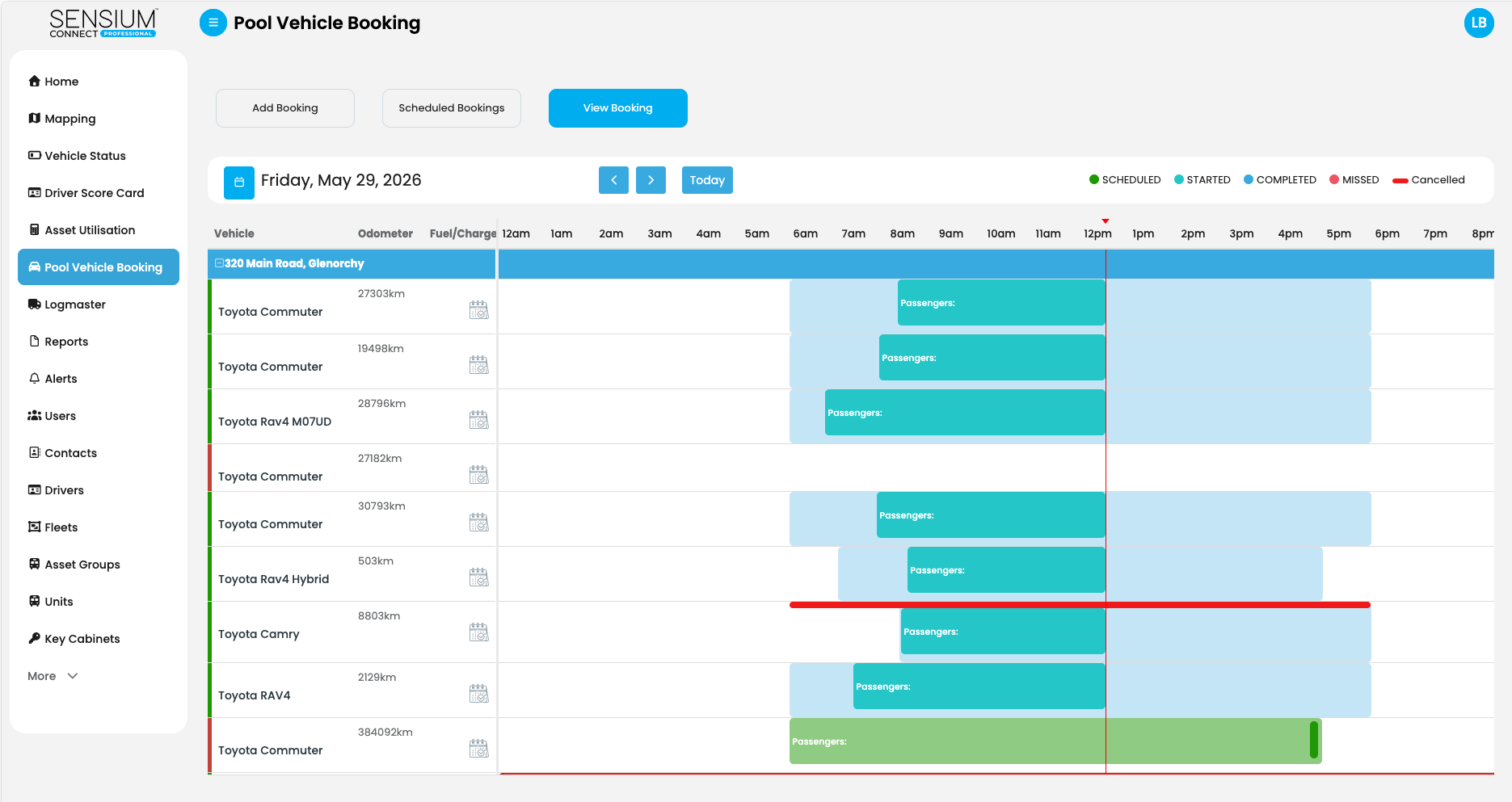
Sensium Connect, pool vehicle booking day view
AI Auto-Select
Allocated by availability, vehicle type, range and permissions.
When a driver requests a vehicle, Sensium evaluates real-time fleet data and allocates the best match: availability, capacity and asset class, utilisation balancing, engine type, odometer, lease restrictions, cost centre and the vehicle type required, such as a ute, a tow bar or five seats. The result is more even use across the fleet, less unnecessary wear and fair access to shared vehicles.

Fleets, cost centres and approvals
Departments see, and pay for, what they use.
Split vehicles into fleets and restrict them to specific cost centres. Drivers only see the fleets they are authorised for; if someone is not qualified to drive a particular vehicle, the system blocks the booking. Recurring bookings and passenger records are built in, and utilisation reports show which vehicles are underused, so the pool can be sized to real demand.

Access however suits you
App, RFID card or key cabinet.
Start with the app alone: staff book, start and end trips in Driver Connect with no installation. Add TRACKbox for keyless entry with an RFID staff card or fob, or add an electronic key cabinet for vehicles that still run on keys. Mix the methods across the fleet as it suits each vehicle.

Electronic key cabinets
The key follows the booking.
For vehicles that still run on physical keys, a Sensium Electronic Key Cabinet releases the right key only to the staff member on the booking, only during the booking window. Staff identify themselves by RFID card, PIN or the app, and every release and return is logged. Existing vehicle locks stay exactly as they are, and the cabinet works without TRACKbox.
Choosing a system
What to look for in a pool vehicle booking system.
The questions worth asking any supplier, and how Sensium answers each one.
Look for
Why it matters
Sensium
Booking rules and approvals
Routine trips should not wait for a person; exceptions should.
Sensium: Automatic approval for routine bookings, manager approval for exceptions such as overnight use.
Driver eligibility
Only authorised, qualified staff should drive each class of vehicle.
Sensium: Drivers are restricted to the fleets they are authorised for.
Automatic allocation
Fewer conflicts, even wear and fair access to the best vehicles.
Sensium: AI Auto-Select allocates by availability, vehicle type, range, utilisation and permissions.
Physical key control
Most pool fleets still run on keys, and keys are where the process breaks.
Sensium: Electronic key cabinets release only the booked key, during the booking window, and log every release and return.
Keyless access
No key handover at all on the vehicles where it suits.
Sensium: RFID staff card or fob with TRACKbox unlocks the vehicle and starts the booking.
A start without hardware
Begin with bookings and add access control later.
Sensium: App-only mode through Driver Connect, with no installation.
Cost allocation
Each department should see, and pay for, what it uses.
Sensium: Fleets and vehicles are associated with cost centres, and usage is allocated accordingly.
Utilisation reporting
The evidence for keeping, moving or retiring vehicles.
Sensium: Reports show which vehicles are underused, so you can size the pool to real demand.
Owned and leased vehicles
Most fleets are a mix.
Sensium: Both. Hardware removes cleanly when a vehicle is returned or sold.
Staff sign-in
IT teams want access managed in one place.
Sensium: Single sign-on through your identity provider, for example Microsoft Entra ID.
Data location
Privacy and procurement requirements.
Sensium: Booking data is stored in Australia, on servers in Sydney.
Rollout and support
How quickly it works, and who answers when it does not.
Sensium: Rollout in weeks, quoted for your fleet. Free email and phone support, 9am to 5pm AEST, Monday to Friday.
See your own booking rules applied in 30 minutes.
Customer story
CTST, Tasmania.
Tasmania's trusted community transport provider for more than 30 years, with nearly 100 vehicles shared between staff and volunteers. CTST switched to Sensium in 2024 after years on a competing platform.
- 01
The problem
CTST needed a simple and efficient pool car management system, so staff and volunteers could book vehicles appropriate for the task at hand.
- 02
The solution
CTST moved all of its pool cars to Sensium's booking platform in 2024. Staff make bookings from desktop or mobile, and the keyless entry module makes vehicle access frictionless.
- 03
The result
A quick transition with no steep learning curve, fleet efficiencies, administrative cost savings and freed-up management hours.
Built for organisations where departments share a vehicle pool.
Frequently asked
Pool vehicle booking questions.
Question 01
What is a pool vehicle booking system?
Question 01
What is a pool vehicle booking system?
A pool vehicle booking system lets staff reserve shared vehicles themselves, applies your organisation's booking rules, controls access to the vehicle or its keys, and records who used which vehicle and when. It replaces spreadsheets, shared calendars and key logbooks with one auditable process.
Question 02
Does the system work without TRACKbox hardware?
Question 02
Does the system work without TRACKbox hardware?
Yes. Sensium Pool Vehicle Booking has an app-only mode that works without any hardware install: staff make, start and end bookings from the Driver Connect app. Installing TRACKbox adds vehicle-side features such as keyless RFID entry, remote locking and unlocking, battery monitoring and vehicle status. Electronic key cabinets also work independently of TRACKbox.
Question 03
How does the system decide which vehicle to allocate?
Question 03
How does the system decide which vehicle to allocate?
When a driver requests a vehicle through Driver Connect, AI Auto-Select evaluates real-time fleet data and allocates the best match based on availability, capacity and asset class, utilisation balancing, engine type, odometer, lease restrictions, cost centre and the vehicle type required. The fleet manager sets the rules; the system applies them consistently on every booking.
Question 04
Can bookings require manager approval?
Question 04
Can bookings require manager approval?
Yes. Bookings that fit standard operating procedure can be approved automatically, while bookings that need special permission, such as overnight use, can require fleet manager approval. Drivers can also be restricted to the fleets they are authorised for, so someone not qualified to drive a particular vehicle class cannot book it.
Question 05
Can booking costs be allocated to cost centres?
Question 05
Can booking costs be allocated to cost centres?
Yes. Vehicles can be split into fleets and restricted to specific cost centres, and the booking system is cost-centre aware, so usage can be allocated to the department that used the vehicle. This suits councils, government, universities and enterprise fleets where several departments share one pool.
Question 06
How do staff collect the key or open the vehicle?
Question 06
How do staff collect the key or open the vehicle?
Three ways, and you can mix them across the fleet. Staff can use the Driver Connect app; an RFID staff card or fob with TRACKbox and a card reader unlocks the vehicle and starts the booking; or an electronic key cabinet releases the physical key for the booked vehicle only, only to the person on the booking, and logs its return.
Question 07
Can staff sign in with their work account?
Question 07
Can staff sign in with their work account?
Yes. Sensium supports single sign-on, so staff sign in with their organisation's existing account and access is managed through your identity provider, for example Microsoft Entra ID.
Question 08
Does it work for leased vehicles?
Question 08
Does it work for leased vehicles?
Yes, owned or leased. The app-only option needs no hardware. If you choose the full feature set with TRACKbox and the optional keyless module, all hardware can be removed cleanly when the vehicle is returned, swapped or sold.
Question 09
Does it work for vehicles other than cars?
Question 09
Does it work for vehicles other than cars?
Any shared vehicle or asset: utes, vans, buses, trucks, lawn mowers, yellow plant and agricultural equipment. If it is shared between staff, the booking system can manage it.
Question 10
Where is the data stored?
Question 10
Where is the data stored?
In Australia. The software is designed in Brisbane, and booking data is stored on servers in Sydney.
Question 11
How long does rollout take?
Question 11
How long does rollout take?
Rollout is measured in weeks, not months. Every fleet is different, so your proposal sets out the timeline for your vehicles, sites and access methods.
Question 12
What support is available?
Question 12
What support is available?
Free email and phone support during business hours, 9am to 5pm Brisbane time (AEST), Monday to Friday.
Talk to Sensium
See pool booking on your fleet.
A 30-minute walkthrough on your fleet mix, departments and access requirements. Rollout is measured in weeks, and your proposal sets out the timeline.